StartTLS SMTP Outbound Filtering with DiscrimiNAT OTF
Implicit TLS as alternative
StartTLS for SMTP is typically not required. Most email providers now support Implicit TLS on port 465.
Click here to learn more
The Opportunistic TLS method, a.k.a. StartTLS, establishes a plaintext connection first which is then upgraded to TLS. This is wholly unnecessary and creates opportunities for MitM attacks and unencrypted transit of data due to misconfiguration or vulnerabilities.
The following content makes the case for not using StartTLS:
-
https://blog.apnic.net/2021/11/18/vulnerabilities-show-why-starttls-should-be-avoided-if-possible/
-
https://www.usenix.org/conference/usenixsecurity21/presentation/poddebniak
-
https://www.feistyduck.com/newsletter/issue_80_vulnerabilities_show_fragility_of_starttls
We can work with your development and engineering teams to upgrade connections from StartTLS to TLS for any application stack and SMTP library. Just raise a support ticket by sending an email to devsecops@chasersystems.com.
RFC 8314, section 3 clarifies this further:
Implicit TLS
Previous standards for the use of email protocols with TLS used the STARTTLS mechanism: [RFC2595], [RFC3207], and [RFC3501]. With STARTTLS, the client establishes a cleartext application session and determines whether to issue a STARTTLS command based on server capabilities and client configuration. If the client issues a STARTTLS command, a TLS handshake follows that can upgrade the connection. Although this mechanism has been deployed, an alternate mechanism where TLS is negotiated immediately at connection start on a separate port (referred to in this document as "Implicit TLS") has been deployed more successfully. To encourage more widespread use of TLS and to also encourage greater consistency regarding how TLS is used, this specification now recommends the use of Implicit TLS for POP, IMAP, SMTP Submission, and all other protocols used between an MUA and an MSP.
Enabling StartTLS support
You may still need StartTLS if that is the only protocol supported by the email service you are working with. Typical examples are Microsoft's High Volume Email service and server to server email delivery. If these are not your use cases, it is simpler and safer to go down the Implicit TLS route as discussed above.
DiscrimiNAT's StartTLS mitigations
DiscrimiNAT allows a very limited bypass of SMTP commands until the TCP connection is upgraded to TLS from plaintext. These include typical SMTP commands from a server and the typical ones from the client until the connection becomes encrypted.
SMTP commands from a server pose some data transfer in risk but the consequences are largely mitigated by having much stricter outbound filtering.
Only two SMTP commands from a client are supported:
EHLO some-host-name\r\n
STARTTLS\r\n
The risk lies in the client-controlled argument to EHLO where large amounts of encoded data or sensitive key material could be sent to an attacker controlled server on the Internet. DiscrimiNAT mitigates this by enforcing a Shannon Entropy limit on that argument.
Shannon Entropy is a measure of the average amount of information contained in a message. It can range from 0 to 8, where the higher the number the more 'information' it can pack by the way of encoding.
EHLO messages sent by a client exceeding the limit you set will be disallowed by DiscrimiNAT.
You can calculate the Shannon Entropy of any text input using GCHQ's CyberChef Entropy tool set to the Shannon scale.
Turning it on
Step 1
You can turn on SMTP commands bypass for StartTLS SMTP by setting the starttls.smtp default preference posture to open. Additionally, you can allow all arguments, no matter how long or complex, to EHLO by setting the starttls.smtp default preference ehlo_entropy_limit to 8. This is accomplished by including the following JSON in the default preferences:
"starttls": {
  "smtp": {
    "posture": "open",
    "ehlo_entropy_limit": 8
  }
}
The full reference for this default preference is here.
Step 2
Create an outbound firewall rule to allow TCP port 587 connections to any destination IP address for the workloads you are expecting StartTLS SMTP to originate from.
StartTLS SMTP is only supported for TCP ports 25 and 587 by DiscrimiNAT. Port 25 is typically blocked for outbound by cloud service providers. You may need to raise a support ticket with them to get it opened up if you require it.
Step 3
Run your StartTLS SMTP workloads. This will generate flow log lines such as the following. Note the reason, entropy and dump fields. The entropy field contains the calculated Shannon Entropy of the argument to EHLO which itself is emitted in the dump field.
{
    "dhost": "203.0.113.1",
    "cat": "client",
    "outcome": "allowed",
    "src": "172.16.0.1",
    "spt": 54321,
    "proto": "starttls",
    "proto_v": "smtp",
    "dst": "203.0.113.1",
    "dpt": 587,
    "reason": "ehlo entropy within configured limit `8`",
    "dump": "foo",
    "entropy": 0.92,
    "timestamp": "2026-06-30T09:30:30.300000000Z",
    "instance": "i-1111111111"
}
Optional: see-thru mode for FQDN discovery
If the StartTLS FQDNs are not already allowed, the subsequent TLS handshake after the initial StartTLS commands will be disallowed by DiscrimiNAT. The usual see-thru monitoring approach can be employed here to capture the traffic for a while and extract FQDNs from it.
From v2.50 of DiscrimiNAT, the see-thru mode can be enabled on a per-port or port-range basis, too. This allows you to enable see-thru in an existing, secured egress filtering posture on just selected ports – for example TCP 587 for StartTLS SMTP.
Click here to see an AWS example
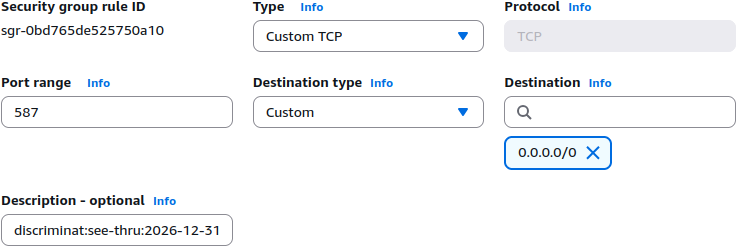
After a period of collecting this data, you can extract the FQDNs from it using our building an allowlist from scratch recipe and create regular TLS rules for the requisite port (see below.)
Click here to see a GCP example
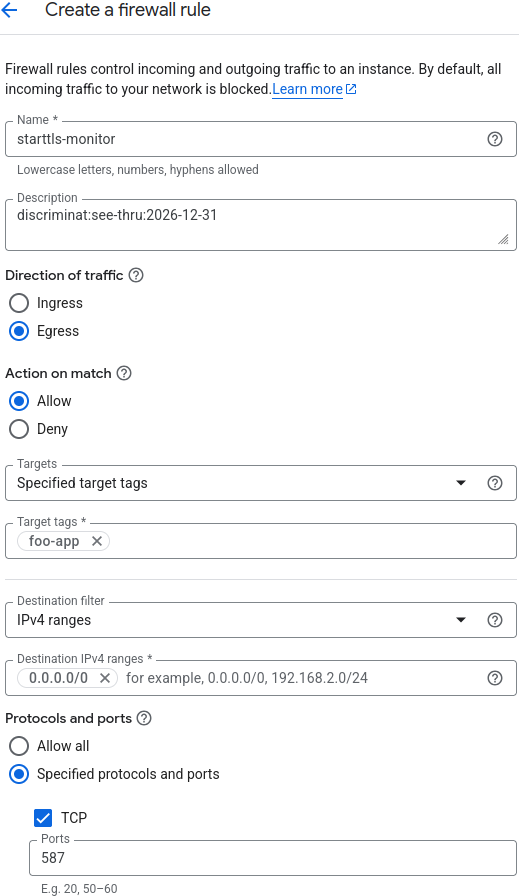
After a period of collecting this data, you can extract the FQDNs from it using our building an allowlist from scratch recipe and create regular TLS rules for the requisite port (see below.)
Creating TLS FQDN rules
After the successful exchange of a few SMTP commands leading to StartTLS, the connection is just like any other TLS connection. Therefore, the usual rules and practices of handling TLS outbound rules apply. The only difference will be the port - which is expected to be set to 587.
Click here to see an AWS example
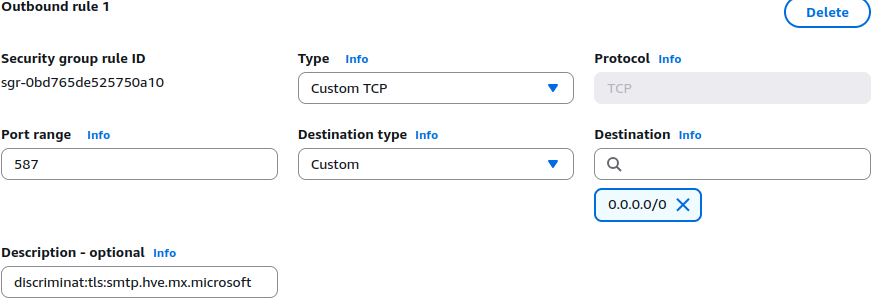
StartTLS commands will be allowed to all allowed destination IP addresses in this Security Group Rule, albeit restricted by entropy limit set earlier.
Click here to see a GCP example
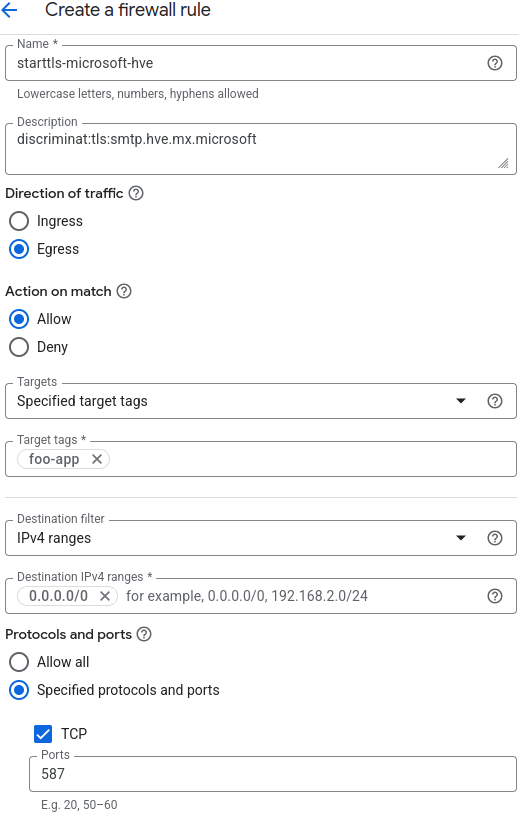
StartTLS commands will be allowed to all allowed destination IP addresses in this Firewall Rule, albeit restricted by entropy limit set earlier.
Tuning the maximum permissible entropy value
It is critical to tune down the ehlo_entropy_limit to set a safe upper limit on the richness of the argument to EHLO per your environment. We can obtain the safe number for your deployment by querying the logs, since the entropy field has been recording the precise values for each EHLO argument that was allowed through.
on AWS
- Navigate to CloudWatch -> Logs -> Log Analytics.
- Select a suitable time range.
- Select the DiscrimiNAT log group.
- Paste the following query in:
fields entropy, dump | filter ispresent(entropy) | sort entropy desc | limit 50
This will provide a table of top 50 entries with the highest entropy values. If everything looks alright under the dump column and not like data exfiltration, pick the highest number and maybe add a little bit of headroom. Otherwise, pick a number where the arguments to EHLO look legitimate for your environment and let everything above that number be disallowed.
on GCP
- Navigate to Logging -> Observability Analytics.
- Select
< > SQLmode. - Paste the following query in substituting
<PROJECT_ID>with your GCP Project ID and press the Run Query button:
WITH
  scope_query AS (
  SELECT
    *
  FROM
    `<PROJECT_ID>._Default._Default` )
SELECT
  CAST( JSON_VALUE( json_payload.entropy ) AS FLOAT64 ) AS entropy,
  JSON_VALUE( json_payload.dump ) AS dump
FROM
  scope_query
WHERE
  log_name LIKE '%/discriminat-flow'
  AND CAST( JSON_VALUE( json_payload.entropy ) AS FLOAT64 ) IS NOT NULL
ORDER BY
  CAST( JSON_VALUE( json_payload.entropy ) AS FLOAT64 ) DESC
LIMIT
  50
This will provide a table of top 50 entries with the highest entropy values. If everything looks alright under the dump column and not like data exfiltration, pick the highest number and maybe add a little bit of headroom. Otherwise, pick a number where the arguments to EHLO look legitimate for your environment and let everything above that number be disallowed.
Limitations
At this time, the dhost field in the flow log line generated by a client issuing StartTLS commands does not contain the FQDN of the destination host but its IP address.